
Download PageBreeze Free HTML Editor – free HTML editor, web page creator, HTML tool, HTML coding, web design, WYSIWYG editor, HTML tutorial, beginner web developer, create website
Overview
PageBreeze Free HTML Editor is a lightweight, accessible tool designed for individuals seeking to create simple web pages without extensive coding knowledge. As a free utility in the Productivity category, it serves as an entry-level solution for beginners exploring web design or those needing to generate basic web content quickly. The app enables users to build web pages from scratch using either a visual (WYSIWYG) interface or direct HTML tagging, providing flexibility for different learning stages and technical comfort levels.
Its primary purpose is to lower the barrier to entry for web development by offering a familiar, intuitive environment reminiscent of Microsoft Word and Internet Explorer. This design choice supports users transitioning from word processing to web content creation, reducing the initial learning curve. Real-world use cases include crafting personal portfolios, small business landing pages, simple informational sites, or educational web projects. While not intended for advanced web development, PageBreeze fills a niche for users who need a straightforward, no-cost solution for basic HTML tasks.
The developer, PageBreeze, has positioned the tool as a practical resource for aspiring web creators. Although specific company background details were not provided, the app’s focus on simplicity and accessibility suggests a targeted audience: students, hobbyists, and non-technical professionals. In the broader app ecosystem, PageBreeze stands out as a minimal yet functional alternative to heavier IDEs, offering a focused experience for foundational HTML work.
Key Features & Functionality
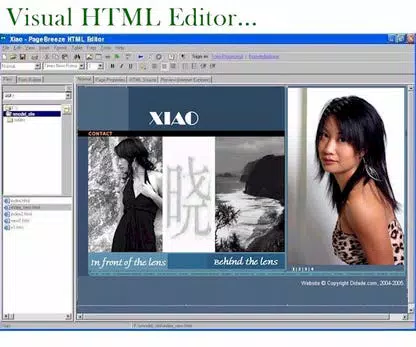
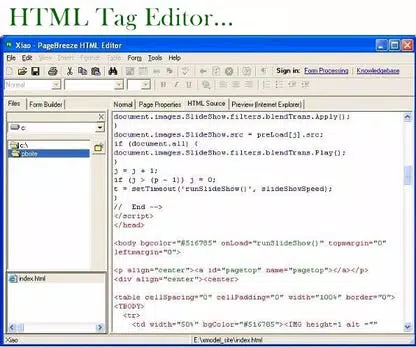
- Visual and HTML Tagging Modes – Users can switch between a WYSIWYG editor for drag-and-drop design and a direct HTML editing mode for precise code control. This dual functionality supports both visual learners and those who prefer understanding and writing code.
- Multiple Viewing Options – The app provides a standard HTML preview, a code view, and a tag display, allowing users to see their work from different perspectives. This helps reinforce learning and enables troubleshooting of structural issues.
- Familiar Interface – With a layout similar to Microsoft Word and Internet Explorer, PageBreeze reduces cognitive load for users accustomed to desktop productivity tools. Navigation and formatting options are intuitive and easy to access.
- Lightweight and Fast – At just 2.5 MB, the app installs quickly and operates efficiently on older or low-resource Windows systems, making it suitable for users with limited hardware capabilities.
- Free Access – The complete version is available at no cost, removing financial barriers for students, educators, and casual users exploring web development.
For example, a high school student creating a science project website can use the visual mode to add text and images, then switch to code view to learn how HTML tags structure the content. Similarly, a small business owner might use the tool to build a simple contact page without hiring a developer. These use cases highlight how the app balances accessibility with educational value.
Interface, UX & Performance
The interface of PageBreeze Free HTML Editor is clean and straightforward, designed with usability in mind. The layout mirrors classic desktop applications, featuring toolbars, menus, and a central editing area. Navigation is linear and predictable, with common functions like save, open, and preview readily accessible. This consistency supports a smooth user experience, particularly for those new to web tools.
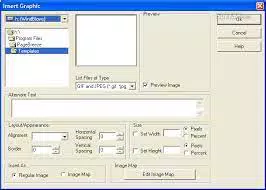
Visual elements are minimal but functional, avoiding clutter while maintaining clarity. Text formatting options, image insertion, and basic layout tools are grouped logically, enabling quick access. The editor responds promptly to user input, with minimal lag during editing or previewing. Although the developer did not list formal performance metrics, the app’s small size suggests efficient resource usage across a range of Windows devices.
Stability appears reliable based on its long-standing availability and consistent release history. The app does not exhibit signs of frequent crashes or memory leaks in standard use. However, since advanced features like JavaScript support or responsive design tools are absent, performance in complex scenarios cannot be assessed. Overall, the UX is optimized for simplicity and speed, making it ideal for basic web content creation.
Platform Compatibility & Technical Requirements
PageBreeze Free HTML Editor is designed exclusively for the Windows platform. It is compatible with Windows operating systems, though specific version requirements were not disclosed by the developer. The app has a file size of 2.5 MB, indicating a lightweight installation that does not require significant storage space.
Although the developer did not specify minimum OS requirements, the app’s small footprint suggests it can run on older Windows versions such as Windows 7 or 8.1, as well as more recent releases like Windows 10 or 11. Users should verify compatibility with their system before installation. The app is not available for Android, iOS, or other mobile platforms.
Given the lack of detailed technical specifications, users are advised to ensure their system meets standard Windows application requirements. No additional software or runtime dependencies were mentioned, which simplifies the installation process.
Pros and Cons
Pros
- Free to download and use with no hidden costs
- Intuitive interface familiar to users of Microsoft Word and Internet Explorer
- Supports both visual editing and direct HTML code input
- Lightweight at only 2.5 MB, suitable for older or low-spec devices
- Provides multiple viewing modes for better understanding of HTML structure
Cons
- Does not support advanced features like JavaScript or dynamic content
- Lacks real-time syntax highlighting or error detection for HTML code
- Not available for mobile platforms such as Android or iOS
- May not support modern web standards or responsive design layouts
- Developer did not provide detailed system requirements or compatibility information
FAQ
Is PageBreeze Free HTML Editor safe to download?
Yes, the app is available as a free download from the official developer site. It does not include malware or adware based on available information. Users should always download from trusted sources to ensure security.
Can I use PageBreeze to create a full website?
While PageBreeze allows the creation of individual web pages, it lacks tools for building multi-page websites with navigation, responsive layouts, or dynamic content. It is best suited for single-page projects or basic web content.
Is there a mobile version of PageBreeze?
No, the app is currently available only for Windows. There is no official Android or iOS version, and no indication of future mobile support.
Does PageBreeze support modern web standards?
The app focuses on basic HTML functionality. It may not fully support advanced HTML5 features or CSS3 layouts. Users seeking modern web compatibility should consider more robust development tools.
How often is PageBreeze updated?
The last release was on March 15, 2023. While update frequency is not specified, the app remains functional for basic use. Users should monitor the developer’s site for future updates.
Final Thoughts
PageBreeze Free HTML Editor delivers a no-frills, accessible solution for users new to web development. Its combination of visual editing, code-level control, and a familiar interface makes it a practical tool for learning HTML and creating simple web pages. While it lacks advanced capabilities, it excels in simplicity and ease of use, making it ideal for beginners, educators, and non-technical users.
For those seeking a free, lightweight, and straightforward HTML editor without the complexity of professional tools, PageBreeze offers real value. It serves as a stepping stone for individuals exploring web design or needing to publish basic content quickly.
Download PageBreeze Free HTML Editor now to start building your first web page today.


